Wednesday, May 11, 2016

Final Review

e-Comm taught me to innovate and design. I can now work independently and carryout client work with some ease while still producing quality work.
I learned to put myself out into the world and how to brand myself well. I also learned how to be a leader during projects and to take charge in a way that things get done.
            I learned all of this and more from my wonderful, fantastic, super awesome, mega cool, slightly annoying (Nettervile), and inspiring teachers. The teachers here in e-Comm showed me how to design and how to teach myself the design  style that I want to pursue. I have created my own style of graphics doing motion design.
            Creating my own style is so important to my brand because my brand is who I am as a person as well as who I am as a designer. Learning the basic and advanced structure of design will forever be my template for the future and I will always reference this structure for all my upcoming projects.
            My greatest strengths are in After Effects doing 2D animation and motion graphics.  I am good at doing the motion graphics because most of them are sports related and my roots are heavily saturated in athletics. My greatest weakness is 3D  animation, I simply do not have an affinity of 3D work nor do I have the patience for character design.
            I’m going to take what I’ve learned from my wonderful four years and take my experience to K-state with me and hopefully begin doing graphics for them. After college I plan to work for a sports team doing there graphics or if that doesn’t work I will take my skills and work in product management using what I know to work with design teams.

            I wouldn’t change a thing about my experience here. I have received a wealth of information and plan to take what I’ve learned and use it throughout the rest of my life even if I do not pursue design. e-Comm is so much more than just a class, it is a family, A family that I will never forget and hopefully stay in touch with.

Monday, May 9, 2016

Senior Show


      Recently Olathe Northwest had its first Senior show for e-Communications. It was really cool to be able to show off all my best work and receive immediate feedback. There where a few industry people there and getting there feedback was the most helpful. It really gave me a good direction to take my work as we'll as gave me new mentors to refer back to.
     I talked a lot on how my form of animation is like what most animation students do. I explained what motion graphics are and how they have many applicable uses in the corporate and athletic worlds. I am excited to move on to college and continue my work at K-state and hopefully move onto bigger and better things in the future.

Friday, September 4, 2015

Senior year Project

Senior year is finally here! This year i want to create an animation in maya or after effects I'm not sure yet. The animation will be two teams of football players (ONW)(ON). the two teams would run at each other and north would get absolutely destroyed. I plan to do  very simple design with the players, the pal is to make the boys and helmets but no limbs so i don't haft to keyframe like 20 sets of arms and legs. I hope to get started on this project soon and will update the blog with my progress.

Tuesday, May 19, 2015

Year Overview


As my Junior year is finally wrapping up, I'm going to go over all of my projects that I have done this year.

The first project i did this year was my 3D character. I did finally figure out what happened, somehow the character got fixed to a point on itself, so the body was kinda welded together.


The second project i worked on was the stop-motion animation. This was probably one of my favorite projects that i did this year. It took a lot of patience, but the result was good.


My third project was to animate a baby book to be sent to a children's cancer ward. I really enjoyed this project. it was very basic because it needed to be. The project was very rewarding to know that it will go to help make kids smile.


The Final project of this year was to do green screen or layering. My group and I decided to create a holotable ( holographic table). It was fun to make and it was fairly simple. After the city was created we rendered it as wireframe and them made it match up with the live video

Tuesday, April 21, 2015

StoryBook

 For our second major project of the year my class was takes with recreating a baby book. oNce completed the books and the animated versions of the books are going to be sent to the children's cancer ward at a hospital. The book I chose was "Who Says Quack?". The book goes through various animals and what sounds they make ultimately leading to the duck which indeed says quack.


 These are the original storyboards for the project.

After the sketches I created my animals in Photoshop.

Once I had all of the animals made i created a background and rotated them off of the scene to follow the pages of the book.
This is the final video, enjoy.

Thursday, November 20, 2014

Quarter 2 Project


Team Bubble Wrap


       For the second quarter, our class was tasked with making a stop motion animation. We were split into groups of four or five. I took the role of director. i was looking for inspiration on what i wanted to do and came across a video of these guys fighting on grass using coolers and rocks to run and jump on, so I'm thinking a fight scene would be really cool, and the others agreed.


     The  story was basically every time the bubble wrap is popped the gravity shifts. so each would be fighting over it while humorously falling in every direction on the gym floor.
unfortunately we couldn't obtain enough time in the gym to use it. so we had to make due in the hallway.


       Since we needed a high space to shoot from we grabbed the schools video strand's crane. Once the camera was on the crane we were off shooting for about three days of classes straight. My job souring the filming was to make sure every one kept on track and that the filming was smooth.
We came to a few complications with school trips as two of the group were gone for about a week, but we still managed to complete our video. i hope you enjoy it.

 To view my group members blogs click on them here

Sam
Travis
Spencer
Noah
Shawn


Tuesday, October 7, 2014

Post render critiuque

Looking back on my project (sorry i couldn't post a video it was too large) it was honestly pretty terrible. I plan to go back and fix it by adding more light and render from more than one camera so i have reference points. The ship actually looks pretty good, but the surroundings need help. i plane to find a seamless texture for the sky dome. Hopefully i can fixed everything I need to, and make it look good in the near future.

Monday, September 29, 2014

Sun Timeline

The sun is currently the main reason for the crashes. when I created it I put a giant glow on it then lit the whole thing on fire on the highest settings(it looked awesome for the two seconds I could look at it before the computer crashed)

To fix the lagg problem I turned down the glow and the intensity of the fire. The result was good it appears as lines of fire which gives that alien atmosphere feel.

Track Timeline

Originally i set finish track on my timeline but after i got the dome fixed i realized that it didn't need much to make a good fly through ( not to mention that with all the effects i already had going on i crash maya like 2-8 times a day). So i added some planet stuff.


Anything else added to the track really wasn't needed as i originally thought. funny how projects sometimes work themselves out.

Friday, September 26, 2014

Skydome Timeline

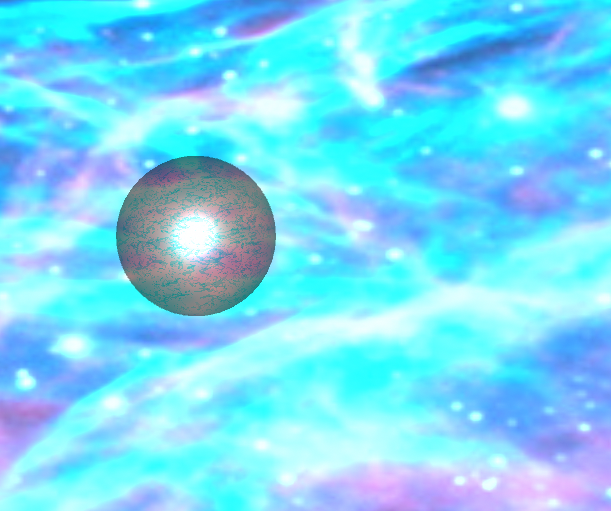
Finding a texture for my sky dome was a harder task than i would have hoped. this was the original and i was so stretched across the sphere it looked awful.


After several tries at trying to find the perfect texture i found this one. I added it to the sphere and it looked amazing.


This is what the texture looks like in rendered view. With the planets i added to the track it is starting to look like a real solar system.

Tuesday, September 23, 2014

Project 1 timeline

Thursday Sept.25= Fix sky dome, be half way done with Track- The Image wrap around the dome is funky is some places so i need to find a more versatile picture. The Track needs work so its not just flying around i want the ship to be flying a round and through things.

Friday Sept.26  = Finish track- Totally have all the extra flyby objects in place.

Monday Sept.29= Fix Sun fire effect (less buggy) -It is majorly slowing things down right now so maybe i can play with the settings and fix that.

Tuesday Sept.30= add other planetary objects-adding background stuff to give the animation that space feel.

Wednesday Oct.1= render out,fix bugs- Pre-render and watch to make sure it is working properly the way i designed it

Thursday Oct.2= Final Render


Monday, September 22, 2014

Q1 Project Grade:11

 I started my project wanting to do something 3D. So i went to mud box and picked a model.
Then i pulled squashed and burned him (not on purpose i don't understand this program so i just kinda went with it).


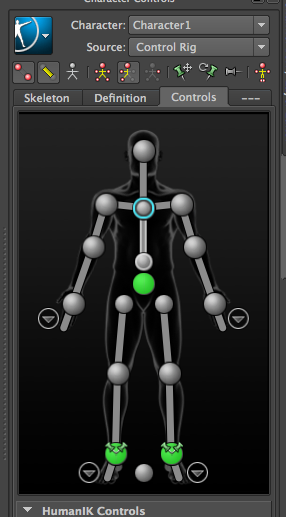
I then opened the model file in Maya and gave him a skeleton (i can't even explain how hard it was to get the fingers in the right places).


After the skeletal rig was in place I used Human IK to be able to move my zombie in the way i wanted him to go (I forgot to mention he is a zombie...oops)

Next after the Human IK rig was in place i started to add skin weights. (this was the most painfully boring thing I've ever done in my life, it is like watching grass grow while the most monotoned teacher gives you a lecture about his childhood)


Well... something went horribly wrong the weights got all messed up and he was stuck to the floor. It was a monumental mess that i was not going back to square one for. So this is where this idea ends and the new idea begins.


The new project Is a spaceship flying scene

After i Modeled the ship to the way i wanted it I created a track for the ship to follow.


Once the track was formed i began to create planetary objects as well as a sky dome. The sky dome is just a sphere with the whole project inside of it. Then i gave the sphere a space texture and then boom you have a space dome.


      I changed the sky dome later because i didn't like it (i should have kept it) This texture is not seamless which looks bad. At this point i gave up on the sky dome.


   The next thing i did was create a sun. this sun is the sole reason that maya crashed like 8 times. The sun is basically a giant ball with a yellow glow and then lit on fire.


      This is what the sun looks like rendered out.                                                            

Monday, May 19, 2014

Personal Logo

This is the process in which i created my personal logo.
  Honestly when we started i had absolutely no ideas i spent about a class period and a half thinking about what i was going to do. after the thinking process i started to sketch my ideas out on paper.


I went through a variety of sketches, some of which i don't know what i was thinking because they are awful and need to be burned immediately.


The next step i took was to finalize my favorite sketches then present them to the class for review and ideas. after the review I picked my favorite and fine tuned it, and here it is my new personal logo.

e-comm Magazine cover

    For this project we were tasked with creating a magazine cover for our e-comm program. It took some thinking but after a while i realized that the Rolling Stone cover was a perfect template for what i was wanting to do. So rolling ravens was born, i tried to find a font similar but not exactly the same as Rolling stone. The next thing i did was put a mac on their and covered up the apple symbol with the e-comm logo. i liked the mac idea but it was missing something so i went to the programs website and downloaded one of the free desktop wallpapers and slimed it down to fit on the Mac. After the main chunk was done i added some page numbers and catchy phrases to the side as kinda a pre index and ended before i could add to much so here is the final product.

Friday, May 9, 2014

Explosion

We were asked to folk a tutorial for making a building window explode.


the hardest part of the project was getting the masks just right. If they were off then you had a random brick engulfed in flame or pard of the lamp post which looked really bad.


After the fire was set you had to add the glass and dust which wasn't hard but you had to get the timing just right to look realistic.


This is the final product, I'm very happy with it. 


Friday, April 25, 2014

Video Copilot Tutorial Project

   Alright so my latest animation project was a tutorial from the site videocopiolot.com. The project was creating a vortex of destructive energy. Instead of using their NY pic as a background i took a picture of my high school's courtyard.
Starts out  simple, import the shot create a cc particle world

At this point I'm far along in the project and fairly happy with it, but i haven't started to mess with it yet. I have changed the settings on the cc particle world to twister to get the vortex/ tornado feel.
 The hardest part of this whole project is keeping track of the particle settings. Personally I think the way its set up is confusing.
So i just duplicated the twister adjusted the size and added an effect to make it dark and kinda out line the original twister. I have also put in kinda lens flare like objects from the tutorial on the bottom to give the energy effect.


 This is the final product with darkened background and scary twister it is complete.


Thursday, April 10, 2014

Personal Logo

   So for my personal logo i wanted to keep it simple but tell about me. The G is obviously for my last name, the guitar head is because i love to play my guitar. Finally the speaker is because i love music, its what motivates me in everything i do, and i like it loud!


   This one is an old logo of mine (I'm not proud of it). While it is creative the quality is lacking. It also doesn't tell my story, all this portrays is that I'm a human being. The logo above has a better quality and appeal. 

eMagine Media Festival

     I recently went to the eMagine Festival hosted by my school Olathe Northwest. many schools attended and many aspiring animators, graphic designers, and movie film makers entered their art into the respective categories for judging and the first place prize.
     It was a very fun night with a lot of creative artists. My experience taught me that handwork really does produce the best results, and prep and pre writing and drawing is essential. Im looking forward to next year when i submit my own work and hopefully win, if your on the boarder of coming defiantly come its loads of fun and you learn a lot.